
Manual Trimmer: Fine-tune your scene boundaries
Review your generated clip sequence before moving to the final edit. The Manual Trimmer integrates a complete media viewer directly into HandySaw DS. You can adjust boundaries and organize your media completely independent of external video editors.
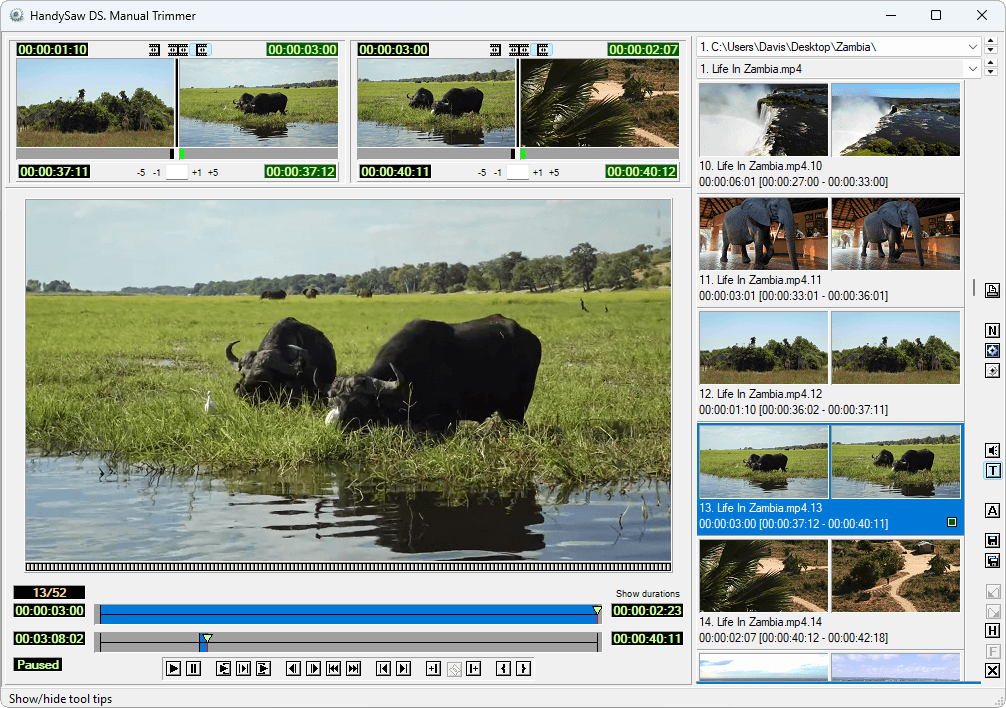
Core capabilities
Review detection results
Play back your original video to verify the exact location of every cut. You can step through the timeline clip by clip. This process ensures perfect organization before committing to your final export format.
Precise trimming
The dedicated trim block provides frame-level control over your media. You can nudge the start and end points of any segment effortlessly. This tool guarantees surgical accuracy for complex action sequences.
Timeline restructuring
The interface includes dedicated tools for modifying your clip layout. You can divide a single continuous clip at any specific frame. The software also allows combining adjacent clips into a unified segment.
Metadata integration
Assign specific names and descriptive text to individual scenes. You can place unnumbered markers at crucial action points inside a clip. This metadata transfers seamlessly into your Adobe Premiere projects.
Advanced playback control
Scan through your footage using accelerated or slow-motion playback speeds. The interface supports multiple timecode display formats. You can switch between absolute frames, standard SMPTE, and Drop-Frame notation.
Session management
The application tracks your editing history comprehensively. You get 99 levels of Undo alongside a dedicated Hold/Fetch memory system. Users can save their active session to an HSQ file and resume work later.
Test the built-in Trimmer on your own workstation
Demo version processes maximum 15 scenes per file. Read all demo specifications